


Airbum - Share together
4.610.00 Reviews
App Specs
- Version
- 2.2.96
- Updated On
- License
- Free
- Downloads
- 50,000+
- Developer
- Airbum
- Categories
- Events
- Platform
- Android
Screenshots

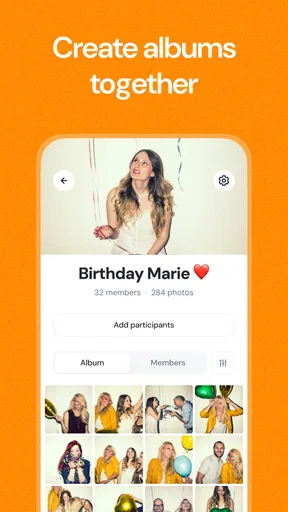



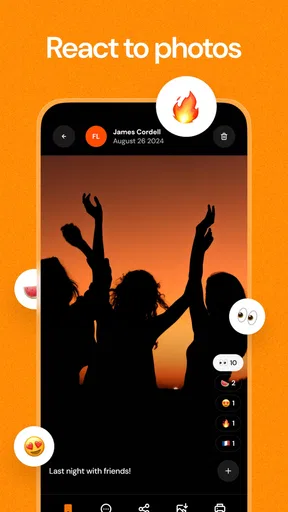
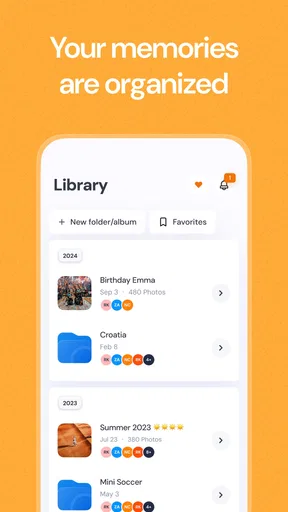

 Analysis by AppCompare
When a group shares photos after an event, the files often end up scattered across chats, camera rolls, and social feeds. I find that the useful idea behind Airbum - Share together is giving one occasion a shared home, so people can add their own pictures and revisit the collection together. It is an events app from Airbum, and it makes the most sense when everyone wants to contribute to the same memory rather than simply send a few images to one person.
What to expect from a shared event space
Airbum is free to download and is rated for Everyone. It has a 4.6 average from around 950 ratings, with more than 50,000 installs. The current version is 2.2.96, and it runs on Android 7.0 or later. Those details suggest a well-established option for group sharing, though the experience still depends on whether the people in your circle are willing to use a separate app for one event.
The main concept is simple: create a shared album, invite the people who belong there, and let the group add photos and videos. That is a different rhythm from a messaging thread, where pictures can disappear between replies, or a public social post, where the audience and tone may be broader than you want. I would think of Airbum as a place for a particular gathering, not as a replacement for every photo tool on your phone.
Getting ready before the event
For a first try, I would choose an occasion with a clear guest list: a birthday, a family meal, a day trip, or a small celebration. Set up the shared space before people arrive, then decide who should be able to see and contribute. Doing that early avoids turning the first few minutes of a gathering into a tutorial, and it gives guests a straightforward destination for the photos they take.
Airbum’s shared albums are called “Bums.” The name may take a moment to understand, but the function is easier to grasp once you treat each one as a separate event collection. I would give each space a name that makes sense to the group and keep its audience limited to the people who need access. That small bit of organization matters if you use the app for more than one occasion.
Your first useful result
The first meaningful success is not merely creating a Bum; it is getting one other person to add a picture and seeing the group’s contributions gather in one place. At a casual get-together, for example, one guest might upload the group photo while another adds a candid moment from earlier. Comments can keep reactions beside the media, so the album becomes a record of the occasion as well as a folder of files.
For a smoother handoff, tell guests what the space is for and when to use it. If the group is not familiar with Airbum, a quick explanation before everyone starts taking pictures is more helpful than expecting them to discover the workflow on their own. I would also avoid making the app the only way to capture an important moment: take the photo normally, then add it to the shared space when it is convenient.
Worth Reading Before You Choose

EA SPORTS FC Mobile 26 Is a Bigger Football Game, but It Takes Time

Flipboard Shows What News Apps Must Do Beyond the Feed

Switching to Android Auto Means Rethinking Your Driving Routine

Google Calendar Makes a Crowded Week Easier to Manage

Ludo King Makes the Most of the Minutes Between Plans

Baby Panda World Brings Quick Play to Modern Phones, but Its Game Library Feels Busy
What can cause confusion
The word “Bum” is the first possible stumbling block, especially for someone opening the app without context. A direct invitation and a plain explanation—this is the album for the event—can make the idea feel much clearer. Another practical distinction is between a private group collection and the community side of the app. Public Bums are for discovery; they are not the right place for family pictures or anything intended only for invited guests.
Uploads also rely on a stable internet connection. That can become inconvenient when several people are trying to add large files while away from reliable service. I would treat the shared album as a place to collect media, not assume every upload will finish immediately. If a photo matters, keep the original on your device until you can see that it has been added successfully.
Choosing it over familiar alternatives
Compared with sending everything through a group chat, a shared event album gives photos more room and keeps them tied to the occasion rather than buried under unrelated conversation. Compared with posting to a social network, it can feel more suitable for a defined group, particularly when the goal is collecting contributions rather than publishing a polished selection. A standard cloud folder may suit people who mainly need file storage, while Airbum’s comments and public discovery make it more socially oriented.
That difference is also a trade-off. A chat may be easier if everyone already uses it and there are only a few images to share. A conventional photo backup service is a better fit if your priority is keeping a personal archive, not coordinating a group. Airbum is strongest when the event itself is the organizing idea and participants are happy to add their own media to a common space.
Who will get the most from it
I would recommend Airbum to families, friend groups, and event organizers who want different people to contribute photos without relying on one person to collect every file afterward. It is especially useful for gatherings where guests capture different angles or moments that the host would otherwise miss. The community feature may also appeal to people who enjoy browsing public collections, provided they keep that separate from private event sharing.
I would skip it for a one-off exchange with someone who does not want another account or app, or for a group that already has a reliable shared-photo routine. It may also frustrate anyone who expects uploads to work smoothly without dependable connectivity. The app is free, but it includes in-app purchases ranging from $2.99 to $54.99 per item, so I would try the basic experience first and only consider paying if a specific paid option is useful to your group.
If you are new to it, start with a small, low-pressure occasion rather than a large event where every guest is counting on the album. Invite a few people, add a couple of photos, and check that everyone understands where their contributions belong. That gives you a realistic sense of whether the shared workflow suits your circle before you depend on it for a bigger gathering.
What Exactly is Airbum?
So, imagine having a platform where sharing memories isn’t just a one-way street. Airbum - Share together is all about creating shared experiences, whether it’s through photos, videos, or even audio clips. It’s like having a digital scrapbook that everyone can contribute to, making it perfect for family gatherings, trips, or even just a fun day out with friends.
Setting It Up
Getting started with Airbum was a breeze. Once you download the app, available on both Android and iOS, the setup process is straightforward. You create an account, and boom, you’re ready to go. The interface is user-friendly, making it easy to navigate. Trust me, you don’t need to be a tech wizard to get the hang of it.
Features that Make It Stand Out
One of the coolest features is the ability to create “Bums” – these are the shared albums where everyone can upload their media. You can set privacy settings, so you decide who gets to see and contribute. It’s perfect for keeping those intimate moments just between the people who matter.
Another neat feature is the option to leave comments on media. It turns a simple photo album into a conversation starter. Plus, the app supports all sorts of media formats, which means you can get creative with what you share.
Usability and Design
Now, I’m all about aesthetics, and Airbum does not disappoint. The design is sleek and modern, with intuitive navigation. Everything is where you’d expect it to be, which means less time figuring things out and more time enjoying the content. It’s not just about looks, though; the app is responsive and fast, making the whole experience seamless.
But What About the Social Aspect?
You might be wondering how this all ties into a social experience. Well, Airbum has this covered with its community feature. You can discover other public Bums, which is a great way to connect with people who share your interests. It adds a layer of discovery that I found really engaging.
A Few Things to Keep in Mind
No app is perfect, and while Airbum offers a lot, there are a couple of things to consider. The app does rely on a stable internet connection, which might be a hiccup if you’re trying to upload large files on the go. Also, while the free version is robust, some features are locked behind a premium subscription. It’s worth considering if you see yourself using it extensively.
Wrapping It Up
All in all, Airbum - Share together is a fantastic app for anyone looking to enhance their photo-sharing experience. It’s not just about sharing; it’s about creating a communal space where memories are built together. Whether you’re planning a family reunion or just want to keep in touch with friends in a more interactive way, Airbum is worth downloading.
So, if you’re ready to take your sharing game to the next level, give Airbum a try. It's available on both Android and iOS, and who knows, it might just become your new favorite app!
Pros
- User-friendly interface and easy navigation.
- Seamless media sharing with friends.
- No intrusive ads during usage.
- Supports multiple file formats.
- Fast uploads and downloads.
Cons
- Requires constant internet connection.
- Limited storage for free accounts.
- Occasional sync issues reported.
- No offline mode available.
- Privacy settings need improvement.
FAQs for Airbum - Share together
What is Airbum - Share together and what does it do?
Airbum - Share together is a social media application designed to enhance photo and video sharing experiences. The app allows users to create shared albums, collaborate with friends and family, and easily organize multimedia content. It's perfect for events, trips, or any occasion where capturing memories together is key.
How does Airbum ensure the privacy of shared content?
Airbum prioritizes user privacy by incorporating robust security measures. Users can control who accesses their shared albums through customizable privacy settings. The app also employs encryption to safeguard data, ensuring that your photos and videos are only visible to those you choose to share them with.
Is Airbum available for both Android and iOS devices?
Yes, Airbum is available for download on both Android and iOS platforms. The app provides a consistent experience across devices, allowing users to seamlessly share and view content regardless of their preferred operating system. You can find it on the Google Play Store and Apple App Store.
Does Airbum offer any in-app purchases or subscription plans?
Airbum is free to download and use, offering a range of features at no cost. However, it may include optional in-app purchases or subscription plans that provide access to premium features, such as additional storage or advanced editing tools, enhancing the overall user experience.
Can I use Airbum offline, or is an internet connection required?
While you can view and organize already downloaded content offline, an internet connection is required to upload new photos or videos, access shared albums, and utilize collaborative features. This ensures that all users have the most up-to-date content and can participate in real-time sharing.


